Yearly Archives: 2009

Visual Studio 2008 SP1 Crashes when exiting the application, in module ModName:msenv.dll

After recently increasing my monitor setup to 3 flat screens! I decided to embark on the ultimate 2-window Visual Studio layout, docking most of my non-text editor windows on monitor 2. After lots of precision placements of windows, I thought I had better close Visual Studio so that it saves my new layout. Well fat chance!

Visual Studio threw up the depressing “Microsoft Visual Studio has encountered a Problem and needs to close.”

Microsoft Visual Studio has encountered a problem and needs to close


For a laugh I decided to fire off the error report via the “Send Error Report” button. The subsequent confirmation button had a link on it which I almost missed.

Visual Studio 2008 Send Error Report


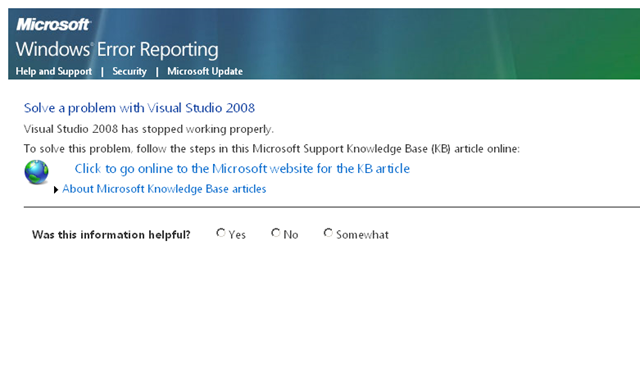
Clicking on this link took you to a rather generic looking Windows Error Reporting page:

Windows Error Reporting Page

However out of curiosity I followed the link to the KB article, expecting it to be next to useless in solving my issue. However imagine my surprise when the article was 100% relative!

KB 960075 Fixes issues with Visual Studio 2008 SP1 IDE crashes when changing the window layout. Hooray for Windows Error reporting, it actually works {on incredibly rare occasions}.


UPDATE: I ended up reading the comments on http://code.msdn.microsoft.com/KB960075 before installing the hotfix and “Window->Reset Window Layout” fixed the crashes for me. In the end I didn’t bother to install the hot fix.


2nd UPDATE: Okay so I *DID* have to install it in the end, and it worked fine.

Tagged , ,

Shared Services User profile synchronization with WSS user profiles stored in the User Information list

Ever wished that the WSS user profile would update it’s values immediately after you’ve just ran a new SSP profile import. Well I just came across a very cool little tool that does just that. The “User Profile Sync” tool hosted on codeplex.

It’s worth noting that SharePoint has timer jobs that run and perform this synchronization process for you. Hover the above mentioned tool allows you to force this process to occur immediately.

Tagged , ,

Target Audience property not displaying / missing for web parts

I came across this problem on a web application that had been working fine, then all of a sudden the “Target Audiences” property disappeared from the web part tool pane.


To solve this problem I re-associated the web application with the Shared Service Provider (SSP) and bounced IIS.

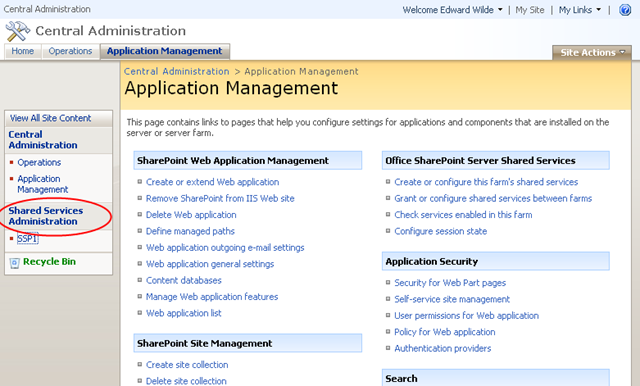
1. Web applications are associated with SSP’s in central administration. Select Shared Services Administration

sharepoint central administration


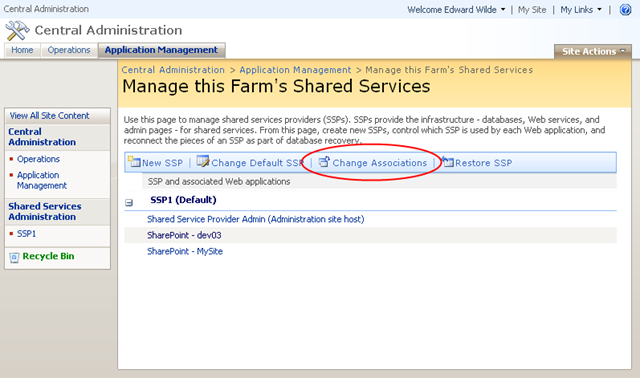
2.  Select Change Associations

sharepoint central administration manage farm shared services


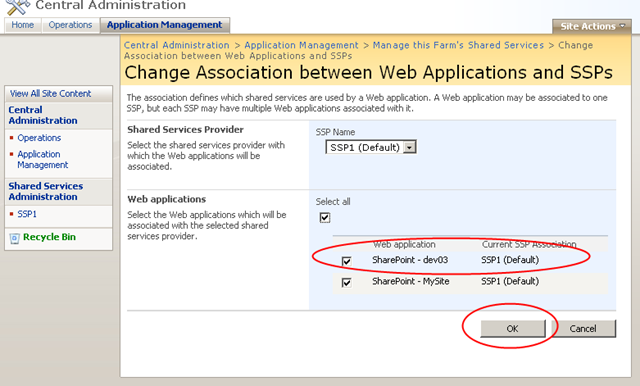
3. Select the web application you are having problems with, and select OK to complete the process.

sharepoint central administration change association between web applications and ssps

4. Perform a  complete IISReset.

Then the property miraculously reappeared – hooray!

Pages - AllCounterParties - Mozilla Firefox (3) ITS BACK!!


During investigating this issue I found the class responsible for rendering this section of the tool was an internal class WebPartToolPartAdvanced. I you really get stuck and my method doesn’t cut it you could dig around in that class and see if you can find anything that helps.

Tagged , , , ,

Unknown SPRequest error occurred. More information: 0x80040e14 – Exception from HRESULT: 0x80040E14

If you get ever get this error message and you are rolling out your own list definition, chances are you messed something up in the shema.xml file.

The first place to look is the event logs. In my case today this was caused due to an incorrectly mapped column name in the field element. The log files gave the clue:

Unexpected query execution failure, error code 8143. Additional error information from SQL Server is included below. "Parameter '@sql_variant1' was supplied multiple times." Query text (if available): "SET NOCOUNT ON; DECLARE @ItemId int,@@iRet int,@ExtraItemSize int,@DN nvarchar(256),@LN nvarchar(128),@@S uniqueidentifier,@@DocUIVersion int,@@Level tinyint;SET @@S='846FD34D-3722-433D-845B-564ACB4037EE';SET @@Level=1;SET @@DocUIVersion = 512;BEGIN TRAN;SET @ItemId=NULL;SET @DN=N'counterparty/Lists/CounterParties';SET @LN=NULL;SELECT @ExtraItemSize = 0  EXEC @@iRet = proc_AddListItem @SiteId = '846FD34D-3722-433D-845B-564ACB4037EE',@WebId='EEFB7523-73C9-4BDF-B2FC-9AA940A0B059',@ListID = 'B6BA34B0-8CBE-4F1F-819C-0460CF82FA35',@RowOrdinal = 0,@ItemDocType = 0,@ItemId = @ItemId OUTPUT,@ItemDir...	 

I had used sql_variant1 twice for the ColName attribute, replacing the duplicate with sql_variant2 did the trick 🙂

Tagged ,

SPUtility.DateParse !♥ seconds: SPUtility.DateParse removes the time component if you parse a date that incudes seconds!??!

Okay here’s another baffling API bug:

If you parse a date using SPUtility.ParseDate(web, “11/29/2009 13:37:12”, SPDateFormat.DateTime, false) it will return you a date object without parsing the time!

Remove the seconds SPUtility.ParseDate(web, “11/29/2009 13:37”, SPDateFormat.DateTime, false) and we are good to go. Full program listing of bug follows:

using System;
using System.Collections.Generic;
using Microsoft.SharePoint;
using Microsoft.SharePoint.Utilities;

public class SPUtilityParseDateTest
{
	public static void RunSnippet()
	{
		using (SPSite site = new SPSite("http://localhost"))
		{
			SPWeb web = site.RootWeb;			
			DateTime parsedDate = SPUtility.ParseDate(web, "11/29/2009 3:37:12 AM", SPDateFormat.DateTime, false);				
			WL(parsedDate.ToString());
				
			parsedDate = SPUtility.ParseDate(web, "11/29/2009 3:37 AM", SPDateFormat.DateTime, false);				
			WL(parsedDate.ToString());
			
		}
	}
		
	#region Helper methods
	
	public static void Main()
	{
		try
		{
			RunSnippet();
		}
		catch (Exception e)
		{
			string error = string.Format("---\nThe following error occurred while executing the snippet:\n{0}\n---", e.ToString());
			Console.WriteLine(error);
		}
		finally
		{
			Console.Write("Press any key to continue...");
			Console.ReadKey();
		}
	}

	private static void WL(object text, params object[] args)
	{
		Console.WriteLine(text.ToString(), args);	
	}
	
	private static void RL()
	{
		Console.ReadLine();	
	}
	
	private static void Break() 
	{
		System.Diagnostics.Debugger.Break();
	}

	#endregion
}

The above code assumes you have US regional settings on your root web.

Tagged , , ,

SPLimitedWebPartManager.SaveChanges throws Microsoft.SharePoint.WebPartPages.WebPartPageUserException: The file is not checked out.

Got stuck on this one for a long time, more than an hour

Microsoft.SharePoint.WebPartPages.WebPartPageUserException: The file is not checked out.  You must first check out this document before making changes.   at Microsoft.SharePoint.WebPartPages.SPWebPartManager.SaveChangesCore(SPLayoutProperties layoutProperties, Boolean httpGet, Boolean saveCompressed, Boolean skipRightsCheck, Guid& newTypeId, Byte[]& newAllUsersProperties, Byte[]& newPerUserProperties, String[]& newLinks)   at Microsoft.SharePoint.WebPartPages.SPWebPartManager.SaveChangesCore(SPLayoutProperties layoutProperties, Boolean httpGet, Boolean saveCompressed, Boolean skipRightsCheck)   at Microsoft.SharePoint.WebPartPages.SPWebPartManager.SaveChangesInternal(SPLayoutProperties layoutProperties, Boolean skipRightsCheck)   at Microsoft.SharePoint.WebPartPages.SPWebPartManager.SaveChanges(Guid storageKey)   at Microsoft.SharePoint.WebPartPages.SPLimitedWebPartManager.SaveChanges(WebPart webPart)

I was using the following code to update a webpart

gWeb publishingWeb = PublishingWeb.GetPublishingWeb(webSite);
SPListItem item = publishingWeb.PagesList.GetItemByFileName(pageName);
if (item != null)
{
	SPLimitedWebPartManager webPartManager = item.File.GetLimitedWebPartManager(PersonalizationScope.Shared);
	PublishingPage publishingPage = PublishingPage.GetPublishingPage(item);

	try
	{
		if (item.File.CheckOutStatus == SPFile.SPCheckOutStatus.None)
		{
			publishingPage.CheckOut();						
		}					
		else
		{
			item.File.UndoCheckOut();
			publishingPage.CheckOut();
		}

		WebPart webpart = webPartManger.WebParts[0];
		// Do something with the webpart
		webPartManger.SaveChanges(webpart); // Now the exception is thrown
		
		
		publishingPage.Update();
		publishingPage.CheckIn(updateComment);

		if (publishingWeb.PagesList.EnableModeration)
		{
			item.File.Publish(updateComment);
			item.File.Approve(updateComment);
		}
	}
	finally
	{
		if (webPartManager != null)
		{
			webPartManager.Dispose();
		}
	}
}

A quick google reveals quite a lot of other people stumped with this problem. Why is it saying the file is not checked out, the lines above it make sure it’s always checked out to the user running the code. Turns out it’s quite a simple fix. Don’t instantiate the SPLimitedWebPartManager until your done making sure the page is checked out!

Working code

gWeb publishingWeb = PublishingWeb.GetPublishingWeb(webSite);
SPListItem item = publishingWeb.PagesList.GetItemByFileName(pageName);
if (item != null)
{
	SPLimitedWebPartManager webPartManager = null;
	PublishingPage publishingPage = PublishingPage.GetPublishingPage(item);

	try
	{
		if (item.File.CheckOutStatus == SPFile.SPCheckOutStatus.None)
		{
			publishingPage.CheckOut();						
		}					
		else
		{
			item.File.UndoCheckOut();
			publishingPage.CheckOut();
		}

		// Now we're certain the page is checked out, grab the web part manager.
		webPartManger = item.File.GetLimitedWebPartManager(PersonalizationScope.Shared);

		WebPart webpart = webPartManger.WebParts[0];
		// Do something with the webpart
		webPartManger.SaveChanges(webpart); // Now the exception is thrown
		
		
		publishingPage.Update();
		publishingPage.CheckIn(updateComment);

		if (publishingWeb.PagesList.EnableModeration)
		{
			item.File.Publish(updateComment);
			item.File.Approve(updateComment);
		}
	}
	finally
	{
		if (webPartManager != null)
		{
			webPartManager.Dispose();
		}
	}
}

Notice that we assign the value of the web part manager after we make sure the page is checked out. Hopefully this saves someone a couple of missing hours i’ll never get back 🙂

Tagged , , ,

Provisioning a Web Part with a predefined ID in your onet.xml of element manifest.

From time to time you might want to provision your WebParts using the CAML markup and then modify them in a feature later on. Most examples on the web find the webpart based on it’s title. i.e.

foreach(Webpart webpart in webpartManager.WebParts)
{
   if(webpart.Title == "Title I'm expecting")
   {
       // Do something with the webpart
       webpart.AuthorizationFilter = "";
       webpartManager.SaveChanges(webpart);
   }
}

However you can specify the ID of a web part in your onet.xml / element manifest like so:

 <View List="Lists/MyList" BaseViewID="1" DisplayName="Counter Parties" Name="List Nmae" RecurrenceRowset="TRUE" WebPartZoneID="Header" WebPartOrder="1">
        <![CDATA[
               <WebPart xmlns="http://schemas.microsoft.com/WebPart/v2">
                    <Assembly>Microsoft.SharePoint, Version=12.0.0.0, Culture=neutral, PublicKeyToken=71e9bce111e9429c</Assembly>
                    <TypeName>Microsoft.SharePoint.WebPartPages.ListViewWebPart</TypeName>
                    <Title>MyList - Workflow Users</Title>
                    <DetailLink>~Site/Lists/MyList/AllItems.aspx</DetailLink>
                    <Description>Use this list to store ... information.</Description>
                    <ID>g_45C819FD_FC4C_44e1_81DD_3AE4FCC34D37</ID>
               </WebPart>
            ]]>
      </View>

Create a new Guid replace the hyphens with underscores and add a “g_” to the beginning of the string g_45C819FD_FC4C_44e1_81DD_3AE4FCC34D37.

Now we can reference the web part in your feature receiver using the indexer property, which is I think you’ll agree much more elegant and less error prone:

Webpart = webpartManager["g_45C819FD_FC4C_44e1_81DD_3AE4FCC34D37"]
// Do something with the webpart
webpart.AuthorizationFilter = "";
webpartManager.SaveChanges(webpart);
Tagged , , ,

Problems installing SharePoint 2010 Beta 2 – SQL Server at XXX has an unsupported version 10.0.2531.0. The minimum required SQL versions…..

First little problem I came across when installing SharePoint 2010 was the following error:

SQL Server at XXX has an unsupported version 10.0.2531.0. The minimum required SQL versions are SQL Server 2005 SP3 CU3, version number: 9.00.4220.00, downloadable from “http://support.microsoft.com/kb/967909”, or SQL Server 2008 SP1 CU2, version number 1.00.2714.00, downloadable from “http://support.microsoft.com/kb/970315”.


CU stands for cumulative update. I was missing the cumulative update for SQL Server 2008, once that was applied setup would allow me to continue.

Tagged ,

SharePoint can not debug assemblies

If you are ever having problems getting Visual Studio to break into your code and you develop by deploying your dll’s into the GAC, it’s probably down to mismatching PDB’s.

  1. Do a Clean Solution
  2. Rebuild the solution
  3. Re-Gac all your dll’s
  4. Reattach to IIS processes

Other hints

Locked files in the GAC

Some times a process will take a lock on an assembly and if, like me, you use WSPBuilder to re-gac your assemblies, you might not notice that it fails to re-gac them. Crack open process explorer, find the rogue process and “Get Some”. Usually Visual Studio is the culprit here.

Tagged ,

Shared Services Administration: Add Audience Rule – No exact match was found. Error

Trying to setup an audience this morning based on being a “Member Of” an Active Directory group. The Active directory group had been created earlier, however entering it into the value field kept producing the annoying


No exact match was found.

Your mileage may vary but I solved this issue by:

  • Running a full import on my user profile
  • Updating the people scopes
  • Running an IISRESET
Tagged , ,
Design a site like this with WordPress.com
Get started