*\bin* *\obj* *.suo *.user *.bak **.ReSharper** **\_ReSharper.** StyleCop.Cache
*\bin* *\obj* *.suo *.user *.bak **.ReSharper** **\_ReSharper.** StyleCop.Cache
If you see something like this:
|
This could be (it was in my case) caused by a very obscure behaviour of the web part manager during provisioning. Namely it doesn’t like your <asp:Content tags to be defined in lower case.
Wrong: Error prone page layout
</p>
<p><asp:content…</p>
<p>
Correct
</p>
<p><asp:Content…</p>
<p>
Yet another SharePoint time waster! 🙂
Recently I came across a rather annoying issue with the XslCompiledTransform class. Namely it really doesn’t like having a BOM (byte order mark) shoved down it’s load method.
I got a the follow error message and stack trace
System.Xml.XmlException: Data at the root level is invalid. Line 1, position 1.
at System.Xml.XmlTextReaderImpl.Throw(Exception e)
at System.Xml.XmlTextReaderImpl.Throw(String res, String arg)
at System.Xml.XmlTextReaderImpl.ParseRootLevelWhitespace()
at System.Xml.XmlTextReaderImpl.ParseDocumentContent()
at System.Xml.XmlTextReaderImpl.Read()
at System.Xml.Xsl.Xslt.XsltInput.ReadNextSiblingHelper()
at System.Xml.Xsl.Xslt.XsltInput.ReadNextSibling()
at System.Xml.Xsl.Xslt.XsltInput.MoveToNextSibling()
at System.Xml.Xsl.Xslt.XsltInput.Start()
at System.Xml.Xsl.Xslt.XsltLoader.LoadDocument()
at System.Xml.Xsl.Xslt.XsltLoader.LoadStylesheet(XmlReader reader, Boolean include)
System.Xml.Xsl.XslLoadException: XSLT compile error.
at System.Xml.Xsl.Xslt.XsltLoader.LoadStylesheet(XmlReader reader, Boolean include)
at System.Xml.Xsl.Xslt.XsltLoader.Load(Compiler compiler, Object stylesheet, XmlResolver xmlResolver)
at System.Xml.Xsl.Xslt.Compiler.Compile(Object stylesheet, XmlResolver xmlResolver, ref QilExpression qil)
at System.Xml.Xsl.XslCompiledTransform.CompileXsltToQil(Object stylesheet, XsltSettings settings, XmlResolver stylesheetResolver)
at System.Xml.Xsl.XslCompiledTransform.LoadInternal(Object stylesheet, XsltSettings settings, XmlResolver stylesheetResolver)
at System.Xml.Xsl.XslCompiledTransform.Load(XmlReader stylesheet)
Viewing the input data to the XslCompiledTransform in debug mode showed a perfectly valid and lovely XSLT file. Visual studio does not display the BOM in the visual representation of the string. Saving the string to disk and examining it in a hex editor revealed that the first 3 bytes were indeed the BOM for UTF-8: EF BB BF
I wrote a little extension method for the bytes class to get rid of the BOM if it’s present
///
///
The bytes.
///
public static byte[] RemoveByteOrderMark(this byte[] bytes)
{
if (!bytes.StartsWithByteOrderMark())
{
return bytes;
}
byte[] results = new byte[bytes.Length – 3];
Array.Copy(bytes, 3, results, 0, bytes.Length – 3);
return results;
}
///
///
The bytes.
///
public static bool StartsWithByteOrderMark(this byte[] bytes)
{
if (bytes == null)
{
return false;
}
if (bytes.Length < 3) { return false; } return bytes[0] == 0xEF && bytes[1] == 0xBB && bytes[2] == 0xBF; } [/sourcecode]
I used the 5.0 evaluation copy of RedGate ANTS profiler tool on a standard Windows Sever 2003 R2 / SharePoint 2007 virtual machine.
To get profiling working with my SharePoint code base I made the following adjustments:
A complete guide to setting up ANTS profiler with SharePoint
The ANTS profiler is extremely easy to use and it quickly helped me narrow down some issues using XlstCompiledTransform objects.
Roy Osherove is giving an hands-on TDD Masterclass in the UK, September 21-25. Roy is author of “The Art of Unit Testing” (http://www.artofunittesting.com/), a leading tdd & unit testing book; he maintains a blog at http://iserializable.com (which amoung other things has critiqued tests written by Microsoft for asp.net MVC – check out the testreviews category) and has recently been on the Scott Hanselman podcast (http://bit.ly/psgYO) where he educated Scott on best practices in Unit Testing techniques. For a further insight into Roy’s style, be sure to also check out Roy’s talk at the recent Norwegian Developer’s Conference (http://bit.ly/NuJVa).
Full Details here: http://bbits.co.uk/tddmasterclass
bbits are holding a raffle for a free ticket for the event. To be eligible to win the ticket (worth £2395!) you MUST paste this text, including all links, into your blog and email Ian@bbits.co.uk with the url to the blog entry. The draw will be made on September 1st and the winner informed by email and on bbits.co.uk/blog
The last two gigs I went to were
Who’s doing this? Surely someone in these heady days of Web 2.0.42.1, if not i’m building it this weekend.

Why would Songkick want to hire me?
Let’s tackle the HTTP part first. I’ve been creating things using HTTP, JavaScript, CSS and HTML since 1997 and really enjoy creating usable and efficient websites.
Homepage
Performance is pretty slick on the home page (logged out). Main improvements would be adding expires headers and gzip-ing plain text assets i.e. html/css/jscript
In 1999 I started a web design consultancy with my brother Andy. To start with I did the programming, he did everything else. We sold the company in 2003 and I stayed on to help build the team from 5 to 10 whole people by 2007.
Continuous integration, TTD, Scrum, lean, kanban and pair programming all sound pretty odd but are really rather useful. I enjoy practicing these techniques at least twice a day! I’ve been a .Net programmer on the server for quite sometime but more on the Alt.Net side than in the MSDN camp.
I’m MVC literate and ready for my next challenge 🙂
Why isn’t there a google code search addon that uses the FireFox search toolbar? Well here’s one that I made until they publish it on the addon’s site.
<searchplugin xmlns="http://www.mozilla.org/2006/browser/search/" xmlns:os="http://a9.com/-/spec/opensearch/1.1/"> <os :shortname>Google Code</os> <os :description>Search Google Code</os> <os :inputencoding>UTF-8</os> <os :image height="16" width="16">data:image/png;base64,iVBORw0KGgoAAAANSUhEUgAAABAAAAAQCAMAAAAoLQ9TAAAAKnRFWHRDcmVhdGlvbiBUaW1lAFNhIDEgTm92IDIwMDggMTQ6NDk6MjEgKzAxMDBOQ0Z3AAAAB3RJTUUH2AsBDTQ5ESKKOgAAAAlwSFlzAAALEgAACxIB0t1+/AAAAARnQU1BAACxjwv8YQUAAAJhUExURTy1RNwaADdb1v/y//7/4/////b6/f/8///4///29tslGhVr0u////b9/+X2/VdzvBoljxMsoBMxxRY/vw4qyx1CtGKEqeT29tEfHRlf2/7/9Pv/4ODm/CgmiwsWpImP2ef5//z/8+//8+3//6/S+gATVqq2wtYfDR9W9+f4/yAuxQ8Sn7zX//f/+/7////07fn7/9Dl/xUfgKOpzc4UGSJg2fX/63qk1gAlvXyPx+7/9vn////7//7/9sLO/jE3sRUqqiUztoaP0Pz999IkGRte0fP//0Ju2wAilvj79P/9/ffx//T//+j/9sTb48rq+dLn/8rT8v3/6ccjABRh4SZbyxxJsP/4+v/w9vL8/f/3//7/+P/9+vv//v/9///42dYgLydT1u7//SJuuRxasf/9+P/6///1+v79//z/9vT/6v/5+90YEiFY6Pf//2+a6Rw4tf/1///8+v/6/vD///H////09Pv///f/7f/6/MsUDh1o5/X7/4GZ3xc7k9PZ+fj/5vD/9/j/4ff/8fv6//X/8c0qACBcyvj//2WF2CM1mer5//r+7//8/fj9/83c88rS1Pf/8//589IoDxVjz+3/9sH1/0Z0yhMzut3r/+n///z//+j//8nX/xw4jCkwdO7u///z/9EQBxVc9u7//9fy/36e6VporyQ6sRoyxgQ2sTFguG+s77/e8PT/8//45s4mAC9b2Pb66/v19+v//uT2/+Hf7PL///Dw+Pn9///2///6+P/x+cwuIgdj6Fa2Ski2OU+tVU2zRUO4UFWzOU2xQU21UlC4PUe5Sky0Oy23QL/oQ4IAAAEMSURBVHjaY9i3/8DBQ4ePHD3GcPzEyVMMDAwbN7FuZtlSvnXb9h07d+3es5dhcUfHkqXLlq9YuWr1mrXr1m9gmBI9ddr0GTNnzZ4zd978BQsXMbSzdHR2dbP09Pax90+YOGkyQ3VNbV19XkNjU3NUC3trUBtDbl5+QWGRVHFJaVm5VEVlFUNiUnJKUGpaFDt7ekZmVnYOQ4hyaFh4hFRkVHRMbFxQfAKDq5u7h6eXN6uPr59/QGBQMIOpmbmFpZW1ja2dvYOjk7MLgwarppa2jq6ePruBoZExiwmDpJS0jKycvIKikrKKqhqLOgM3Dy8vH7+AoJCwiKiYOKsEAxMzCysUsLFzcHIxoAFGALW1VP5QbPUrAAAAAElFTkSuQmCC</os> <updateinterval>7</updateinterval> <searchform>http://www.google.com/codesearch</searchform> <os :url template="http://www.google.com/codesearch?q={searchTerms}" method="GET" type="text/html"> </os> </searchplugin>Download
google code search plugin for FireFox
Installation
Put just downloaded XML file to the directory under the next path:
in Windows – %AppData%\Mozilla\Firefox\Profiles\%FirefoxProfile%\SearchPlugins\
in Liunx – ~/.mozilla/firefox/%FirefoxProfile%/SearchPlugins/
in Mac – ~/Library/Application Support/Firefox/Profiles/%FirefoxProfile%/SearchPlugins/
where
%AppData% – current user Application Data directory under his home directory, e.g. C:\Documents and Settings\User\Application Data\ in Windows XP, Server 2003 and C:\Users\User\AppData\Roaming\ in Windows Vista, Windows 7 and Server 2008
%FirefoxProfile% – current Firefox profile directory, e.g. 1ab2cdef.default
Reference: http://godfather.net.ru/software/firefox/search/Installation.aspx
I lost 3 hours of my life to a stupid collision of template ID’s. Creating a site collection or child web based on one of my custom templates kept failing with the following UI error message
"The template you have chosen is invalid or cannot be found."
The SharePoint logs were less than helpful:
02/15/2009 14:32:22.97 output.exe (0x10CC) 0x1E14 Windows SharePoint Services General 72k2 High Failed to apply template "xxxxxx#0" to web at URL http://xxxxxx/sites/test2, error The template you have chosen is invalid or cannot be found. 0x81071e44
02/15/2009 14:32:22.97 output.exe (0x10CC) 0x1E14 Windows SharePoint Services General 8kh7 High The template you have chosen is invalid or cannot be found.
Solution:
Make sure all of the site definition configurations located in %programfiles%\Common Files\microsoft shared\Web Server Extensions\12\TEMPLATE\1033\XML have a unique IDs. Microsoft suggests ID values above 10000 to avoid conflicts with future Microsoft supplied site definitions (http://msdn.microsoft.com/en-us/library/ms441616.aspx). Most custom site definitions therefore use 10001 and if two site definitions have the same ID you wind up wasting several hours trying to figure out why it’s not provisioning your site definition.
Typemock are offering their new product for unit testing SharePoint called Isolator For SharePoint, for a special introduction price. it is the only tool that allows you to unit test SharePoint without a SharePoint server. To learn more click here.
The first 50 bloggers who blog this text in their blog and tell us about it, will get a Full Isolator license, Free. for rules and info click here.
Over the next couple of months I hope to cover some of the common software design patterns. I’m going to cover them in the order they are written about in the book Head First Design Patterns.
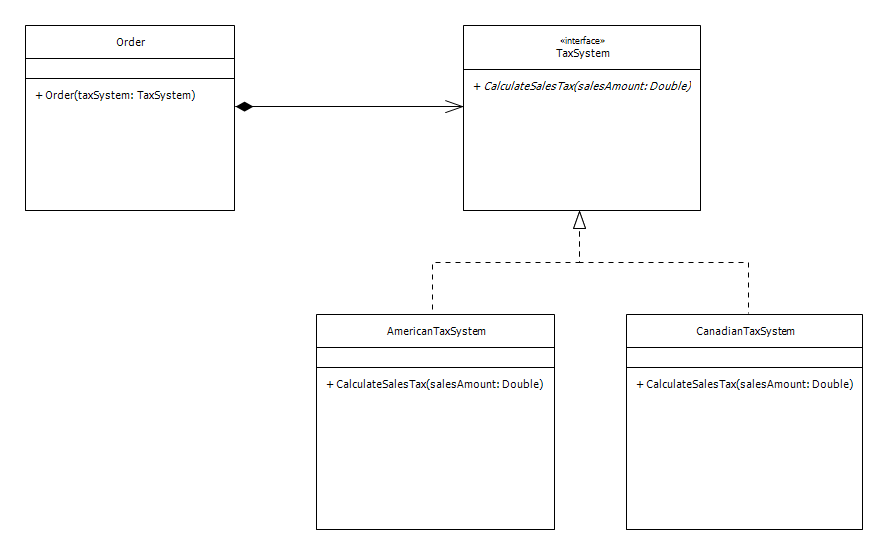
The desire to model varying implementations of the same core behaviour and to decouple this behaviour from the consuming client.
The Strategy pattern defines a family of behaviours or algorithms. Each type of algorithm is encapsulated in a separate entity. The client can consume different types of algorithm interchangeably.
 Edward Wilde